
New in 1.6: two panes on iPhone Duo, iPad and Mac
Restore and Colorize Old Photos
Repair scratches, tears and fading in old family photos and bring back natural colour, while the people in them still look like themselves. For anything else, describe the change in a chat - or generate a new image from text.

PRO free for 3 days on the weekly plan
- 1 coin per restore or chat edit
- Errors refunded automatically
- Free coins every day you open the app
- Nano Banana 2 and Gemini 3 Pro Image
- iPhone, iPad and Mac

Colorize & Restore
Old Photos, Back to Life
Photograph a faded, scratched or black-and-white print and tap one button. The damage is repaired, natural colour comes back, and the people in it still look like themselves.
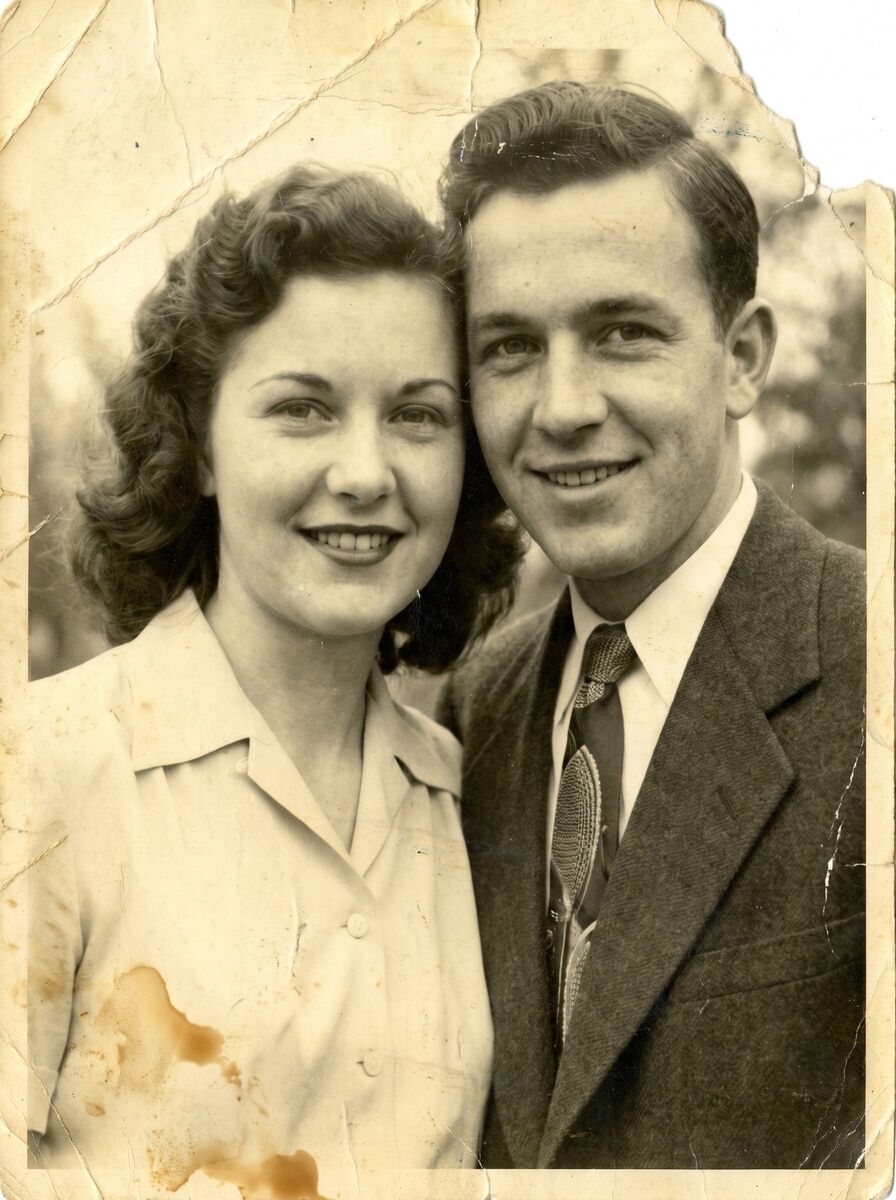
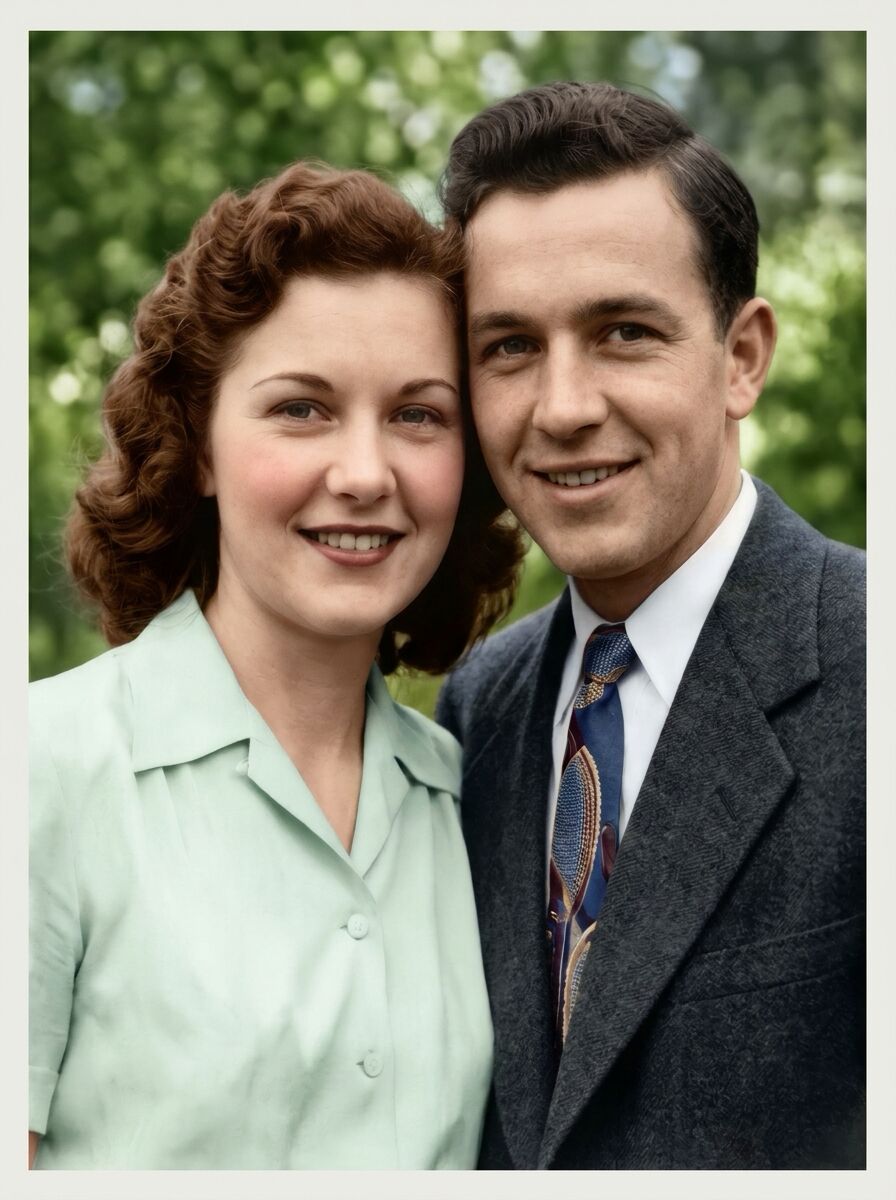
A torn, stained print
Tears, creases and water stains repaired, faded sepia turned into natural colour.
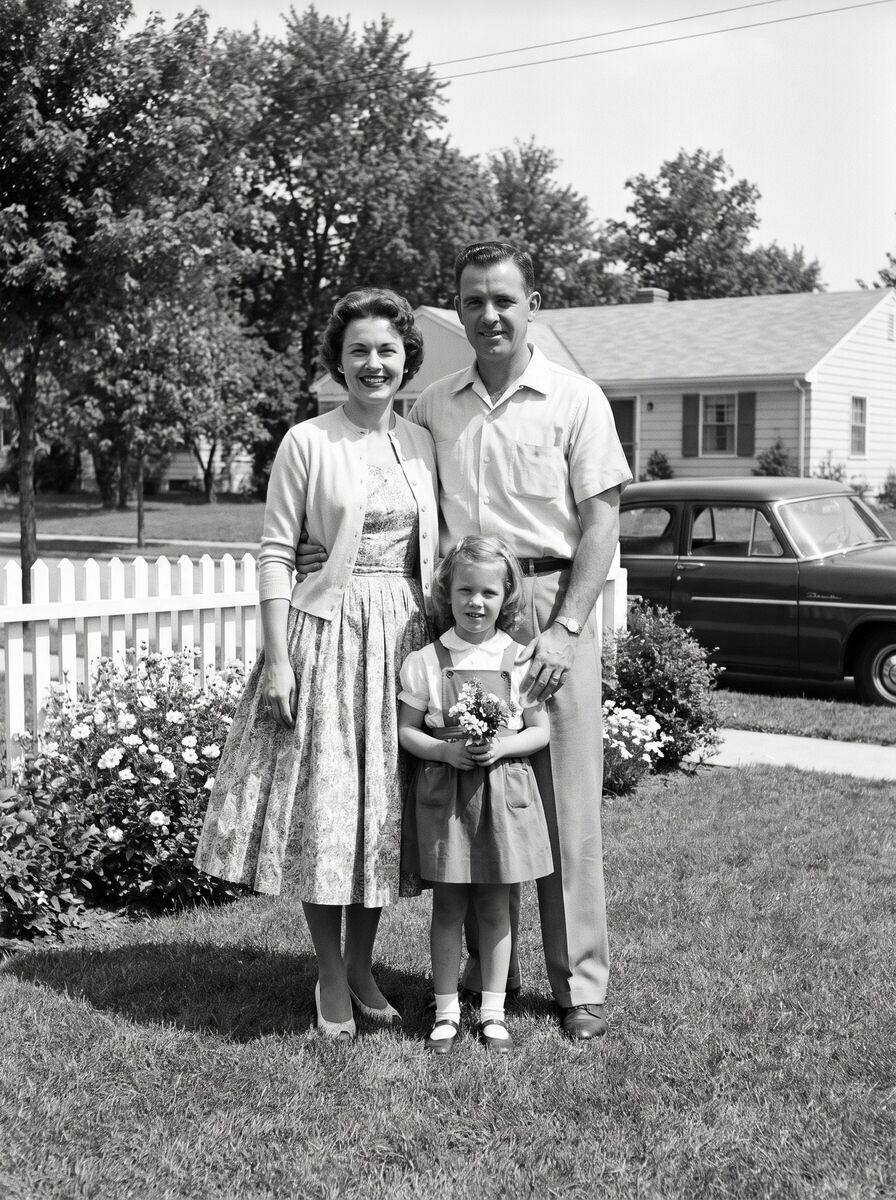
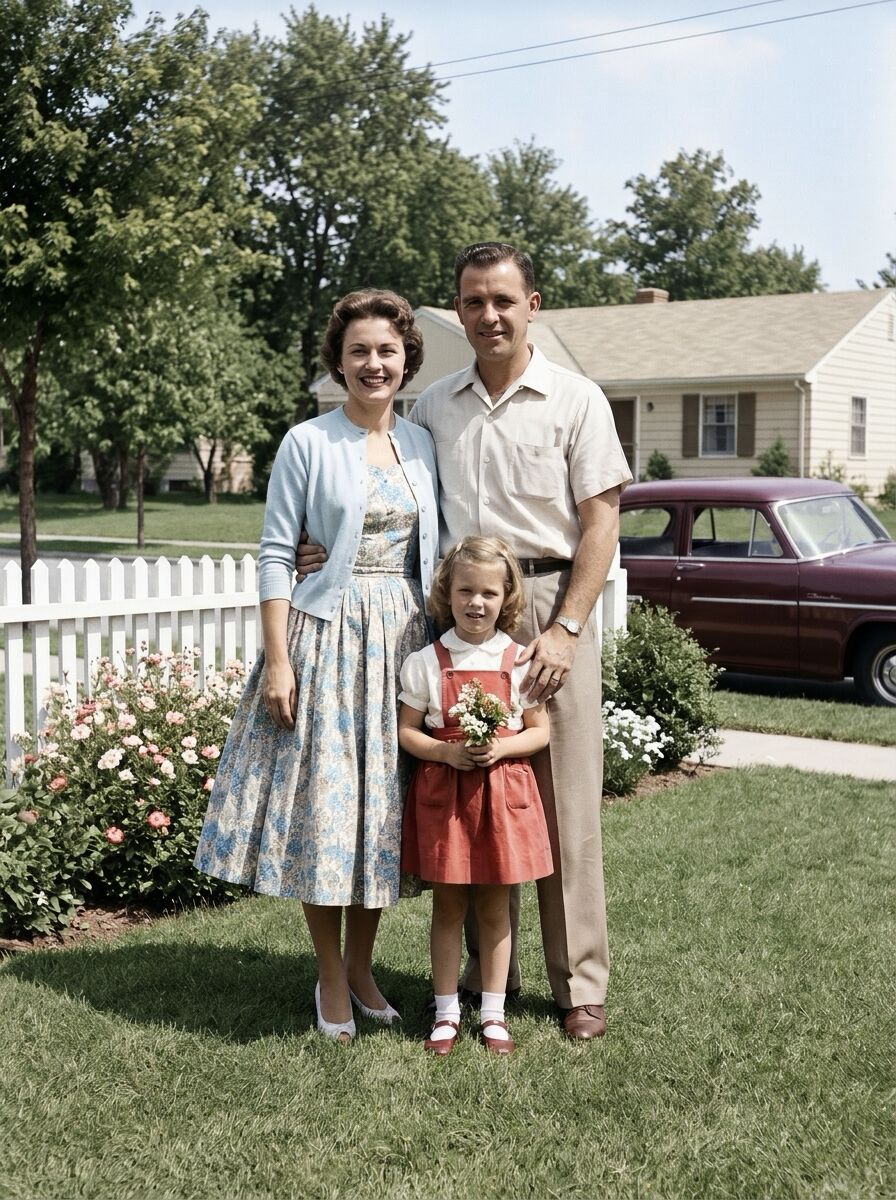
A black-and-white snapshot
A family photo from the 1950s in natural colour, down to the dress, the house and the car.


The old photos are AI-generated examples. The restored versions are what Colorize & Restore returned on the PRO chat model, unretouched.
One tap takes care of
- Scratches and tears
- Creases and stains
- Dust and film grain
- Fading
- Lost sharpness
- Missing colour
Photograph the print
In even daylight, without flash, holding the phone straight above it. Crop the edges away - or start from a scan.
Tap Colorize & Restore
Open the photo in AI Chat and tap the quick action, or describe the damage in your own words.
Fine-tune in the chat
Reply with what to change - 'softer colours', 'sharper faces', 'remove the stain on the left'. Each reply is a new version.
1 coin per reply, or part of your daily allowance on PRO and MAX. If an edit fails with an error, the coin comes back automatically.
A Photo Editor You Talk To
No sliders, no masks, no tutorials. Describe the change the way you would to a friend who knows Photoshop.
Pick a photo
One photo from your library, or several - the editor can combine them into a single image.
Say what to change
Type it like a message: 'make it evening', 'swap the background for a beach', 'put us in the same picture'. Or tap a quick action.
Keep going
Every reply is a new version. Ask for another tweak, go back, or save. Chats are kept so you can pick up where you left off.
One-tap quick actions built in
- Colorize & Restore
- Fix Imperfections
- Remove Background
- Change Background
- Blur Background
- Remove People
- Remove Objects
- Pro Headshot
- Brighten Image
- Increase Contrast
- Sharpen Details
- Color Correction
- Studio Ghibli Style
- Anime Style
- 3D Cartoon
- Make Vintage
- Black & White
Every chat edit costs 1 coin, or comes out of your daily allowance on PRO and MAX, whose chats start on the higher-quality PRO model. If an edit fails with an error, the coin comes back automatically.
Version 1.6
PictorAI for Mac
A native macOS app, not the iPhone layout stretched across a desktop. The same account, the same coins, the same conversations - in a big window where the photo and the chat sit side by side.

Built like a Mac app
A sidebar for AI Chat, Generate and History with every conversation one click away, a Settings window and a full menu bar. Each result opens in a window of its own, so you can keep several side by side.
Two panes, new in 1.6
AI Chat and History now work in two panes too: the photo you're editing sits beside the conversation, and the creation you pick beside the gallery, the way a result already sat beside the prompt form. An iPad in landscape and an open iPhone Duo get the same panes - on the Duo they meet right at the fold.
Keyboard, clipboard, drag and drop
A new chat on ⌘N, a new image on ⇧⌘N, sections on ⌘1, ⌘2 and ⌘3. ⇧⌘V pastes the image on the clipboard into the chat, and a photo dropped onto the chat is ready to edit - drag the result out to Finder, Mail or any other app.
One account on every device
One App Store purchase covers iPhone, iPad and Mac. Your subscription, your coin balance and your chats follow you, so an edit started on the phone is waiting on the Mac.
PictorAI for Mac needs macOS 15 or later. It is the same app and the same App Store purchase - there is nothing extra to buy.
AI Photo Generator Examples
Portraits, characters, fantasy scenes - every image below started as one line of text
Everything in One App
Photo restoration, chat editor, image generator, portraits, logos and tattoo previews - one coin balance, one history
Old Photo Restoration
Upload a faded, torn or black-and-white print and tap Colorize & Restore. Scratches, creases and stains are repaired, colour comes back, and the people in it still look like themselves.
Chat Photo Editor
Upload a photo and say what to change - 'put me in a park', 'make my sweater red', 'remove the person behind me'. The edit comes back as a reply. No layers, no brushes.
AI Image Generator
Describe the shot in plain words and get it back in seconds. Pick Fast, Normal or Ultra depending on how much detail you need.
Realistic Portraits
Headshots, profile pictures and avatars that look like real photography - natural skin, real lighting, no plastic look.
Logo Maker
Type your brand name and what it does, get a set of logo directions to work from - minutes instead of a week of back-and-forth.
Tattoo Preview
See a design on skin before you commit to it. Try styles and placements, then bring the result to your artist.
AI Art Generator Styles
Pick a look and the app applies it to whatever you generate

Ghibli

Movie Poster

Oil Painting

Western

Anime

Business Portrait

Polaroid

Ancient Statue
Updated September 2026
Runs on Google's Newest Image Models
Three modes, three models. The app names the mode; here is what is behind each one and what it costs.
Fast
1 coinGemini 3.1 Flash-Lite Image
Nano Banana 2 Lite. Quick drafts, and the Fast model in AI Chat.
Normal
2 coinsGemini 3.1 Flash Image
Nano Banana 2. The everyday choice, and the PRO model in AI Chat.
Ultra
5 coinsGemini 3 Pro Image
Nano Banana Pro. Most detail; 2K output on MAX for 10 coins.
Now running Nano Banana 2
Every mode moved to Google's Nano Banana 2 generation - Gemini 3.1 Flash Image and its Lite sibling for chat edits, Nano Banana Pro for Ultra. The coin prices did not change: a chat edit is still 1 coin.
Edits that stay on the photo
The new generation holds on to faces, clothes and background detail while it changes the one thing you asked for.
Longer instructions, followed
Several conditions in one message - the place, the light, what has to stay untouched - land more often than they did before.
Same price, nothing to update
Models are swapped on our servers, so the app you already have is on the current generation without a new version from the App Store.
Models are swapped server-side as Google ships new ones, so the app keeps using the current generation without waiting for an update. Prompts and photos go to Google only to produce your image.
New: daily bonus
Free Coins for Every Day You Open the App
Open PictorAI on consecutive days and each day pays a little more. A full week adds up to 62 free coins, and then the next week begins.
- Day 12 coins
- Day 22 coins
- Day 33 coins
- Day 45 coins
- Day 510 coins
- Day 615 coins
- Day 725 coins
A full week: 62 coins
Open the app once a day
The coins land in your balance as soon as you open PictorAI on your iPhone, iPad or Mac. No ads to watch, nothing to claim.
Keep the streak going
Each day in a row pays more, up to 25 coins on day 7. Miss a day and the week starts over from day 1.
Never miss a day
Turn on the evening reminder and PictorAI nudges you on the days you haven't opened it yet. Switch it off in Profile (Settings on the Mac) at any time.
Days follow your own time zone. One bonus a day per account, whichever device you open. For everyone - with or without a subscription.
Pay per Image, or Subscribe for a Daily Allowance
Free to install. Coins pay for individual images and edits; PRO and MAX include a daily allowance and the better chat model.
Coins
No subscription. Buy a pack, collect free coins every day you open the app, or earn 30 by sharing it once.
- 1 coinChat edit or Fast image
- 2 coinsNormal image
- 5 coinsUltra image
- 10 coinsUltra at 2K (MAX)
PRO
For people who edit or generate every day.
- 25/day generations included, resets daily
- PRO chat higher-quality edits with Nano Banana 2
- Styles all 20+ premium art styles
- +25 coins bonus when you start a trial
Try PRO free for 3 days on the weekly plan. Cancel in your App Store settings at least 24 hours before the trial ends and you will not be charged.
MAX
Everything in PRO, twice the allowance, 2K output.
- 50/day generations included
- 2K Ultra Mode at 2K resolution
- Early first to get new styles and tools
Subscribers keep spending coins past the daily allowance. Current prices for your region are shown in the App Store. See the full FAQ.
Bring Your Old Photos Back to Life
Install PictorAI, photograph an old print and tap Colorize & Restore.
Try PRO free for 3 days on the weekly plan